TapData Cross-Data Center Disaster Recovery Guide
This guide outlines TapData's disaster recovery (DR) solution for cross-data center or availability zone failures, ideal for production setups where an entire site outage could disrupt operations. By leveraging a "primary cluster + cold standby services + hot data" model, it ensures real-time data replication across regions and quick service failover, minimizing downtime during regional disruptions.
For high availability within a single cluster (to handle individual node failures), see Deploying High-Availability TapData Enterprise (Three Nodes).
1. Overview and Solution Design
TapData uses a distributed architecture with key components like TapData Management (for task orchestration), TapData Engine (for data processing), TapData Agent (for data collection), and MongoDB (for metadata storage). While intra-cluster high availability protects against single-point failures, a full data center outage can still halt business activities.
To boost resilience and data continuity, TapData offers a cross-data center/availability zone DR approach, suitable for scenarios such as:
- Multi-site deployments: Primary and standby sites in separate data centers or geographic regions.
- Regional outage protection: Handling power failures, network blackouts, natural disasters, or other site-wide issues.
- Stringent continuity needs: Meeting low Recovery Time Objective (RTO) and Recovery Point Objective (RPO) targets.
- Compliance standards: Fulfilling regulatory demands for robust DR capabilities.
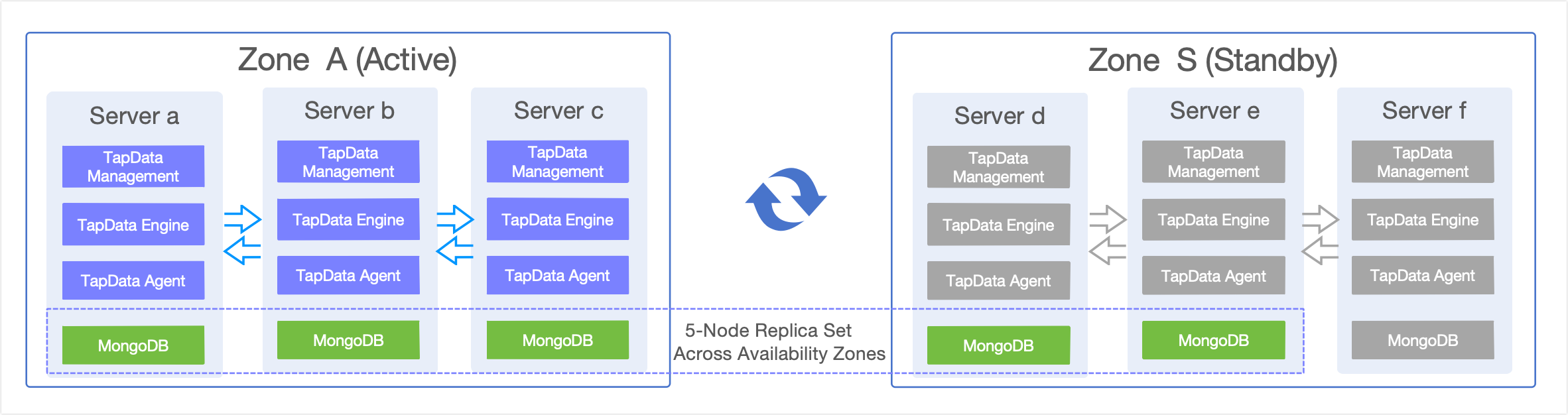
The solution employs a dual-site setup with TapData's stateless design and MongoDB's cross-region replica sets for seamless high-availability DR.
- Zone A (Primary Cluster): Hosts the full TapData stack (3 nodes) + MongoDB replica set (3 nodes), managing all production workloads.
- Zone S (Standby Cluster): Pre-configured TapData services (stopped, 3 nodes) + MongoDB replica set (2 nodes active + 1 pre-provisioned), focused solely on data replication during normal operations.
MongoDB's cross-region replica set handles real-time syncing of tasks, metadata, and system states, keeping the standby site in sync with the primary. For detailed replica set setup and failover details, refer to the sections below.
2. Host Setup and Deployment Requirements
Based on the architecture above, here's an example host configuration and deployment guidelines:
2.1 Host Configuration Details
| Hostname | IP Address | Zone | MongoDB Role | TapData Services | Notes |
|---|---|---|---|---|---|
| tapdata-a | 192.168.1.10 | Zone A | Primary | Running | Primary node |
| tapdata-b | 192.168.1.11 | Zone A | Secondary | Running | Secondary node |
| tapdata-c | 192.168.1.12 | Zone A | Secondary | Running | Secondary node |
| tapdata-d | 192.168.2.10 | Zone S | Secondary (non-voting) | Stopped | Standby node |
| tapdata-e | 192.168.2.11 | Zone S | Secondary (non-voting) | Stopped | Standby node |
| tapdata-f | 192.168.2.12 | Zone S | Pre-provisioned (not in replica set) | Stopped | Activated only during Zone A failure |
Use dedicated lines for cross-region connectivity, aiming for latency under 100ms to maintain MongoDB replication performance and timely failure detection. Ensure required ports are open, such as MongoDB (27017), TapData Management (3030), TapData Engine (3080), and SSH (22).
2.2 MongoDB Cross-Region Replica Set Configuration
MongoDB serves as TapData's core storage for task configs, metadata, and system states. This setup uses a 5-node cross-region replica set: Zone A (3 nodes) + Zone S (2 nodes), with priorities favoring Zone A for the primary role.
Key Benefits:
- Automatic Syncing: Data replicates from Zone A to Zone S in real time.
- Failover Automation: Built-in election handles primary node failures.
- Redundancy: Multiple copies prevent data loss from single failures.
Recommended Replica Set Config:
rs.reconfig({
  members: [
    { _id: 0, host: "192.168.1.10:27017", priority: 2 },  // Zone A primary
    { _id: 1, host: "192.168.1.11:27017", priority: 1 },  // Zone A secondary
    { _id: 2, host: "192.168.1.12:27017", priority: 1 },  // Zone A secondary
    { _id: 3, host: "192.168.2.10:27017", priority: 0 },  // Zone S secondary
    { _id: 4, host: "192.168.2.11:27017", priority: 0 },  // Zone S secondary
  ]
})
Recommended Write Concern Settings:
// TapData's suggested MongoDB write concern for reliability
db.adminCommand({
  setDefaultRWConcern: 1,
  defaultWriteConcern: {
    w: "majority",      // Confirm after writing to most nodes
    j: true,            // Ensure journal commit
    wtimeout: 5000      // 5-second timeout
  }
})
This ensures writes are acknowledged only after reaching at least 3 nodes (majority in a 5-node set), guaranteeing consistency. Writes typically occur in Zone A, with automatic replication to Zone S.
2.3 TapData Service Configuration
Connection String Setup: All TapData nodes share a unified MongoDB replica set connection string:
# Replace {databaseName} with your TapData database name
mongodb://192.168.1.10:27017,192.168.1.11:27017,192.168.1.12:27017,192.168.2.10:27017,192.168.2.11:27017,192.168.2.12:27017/tapdata?replicaSet=tapdata-rs
Deployment Strategy:
- Zone A: All TapData services run actively for production.
- Zone S: Services are installed and configured but remain stopped as cold standby.
- Config Sync: Regularly mirror configs from Zone A to Zone S.
Key Config Files to Sync:
application.yml: Main TapData service config.agent.yml: TapData Agent config.
Sync Command Example:
# Copy configs from Zone A to Zone S (adjust <work_dir> based on your TapData install path)
scp <work_dir>/conf/{application.yml,agent.yml} root@192.168.2.10:<work_dir>/conf/
scp <work_dir>/conf/{application.yml,agent.yml} root@192.168.2.11:<work_dir>/conf/
scp <work_dir>/conf/{application.yml,agent.yml} root@192.168.2.12:<work_dir>/conf/
3. Disaster Recovery Procedures
3.1 Recovery Targets
3.1.1 Recovery Time Objective (RTO)
- Detection: 1-2 minutes (via alerts + manual confirmation).
- MongoDB Failover: 30 seconds-1 minute (automatic election).
- TapData Startup: 2-3 minutes (service launch + health checks).
- Load Balancer Switch: 1-2 minutes (DNS/LB updates).
- Total RTO: 5-8 minutes.
3.1.2 Recovery Point Objective (RPO)
- Real-Time Sync: Handled by replica set replication.
- Theoretical RPO: ≤ 30 seconds (accounting for network latency).
- Practical RPO: ≤ 1 minute (factoring in potential jitter).
3.2 Failover (Zone A to Zone S)
Set up monitoring and alerts for automatic failure detection—see Monitoring and Automation for details.
3.2.1 Pre-Failover Checks
Confirm Outage:
- Multi-Path Verification: Use various routes and monitoring tools to verify Zone A is inaccessible.
- Scope Assessment: Determine if it's a full Zone A failure or isolated nodes.
Standby Readiness:
- Zone S MongoDB Health: Ensure tapdata-d and tapdata-e are running with no replication lag.
- TapData Configs: Confirm configs are synced and dependencies are available.
- Connectivity: Verify Zone S can reach external systems.
3.2.2 Failover Steps
-
Start MongoDB on Zone S
Log in to tapdata-f and run:
systemctl start mongod -
Reconfigure Replica Set
Log in to tapdata-d or tapdata-e and execute:
mongo --host tapdata-d:27017  # Or tapdata-e:27017

// Add node f first
rs.add({ _id: 5, host: "192.168.2.12:27017", priority: 0 })

// Then reconfigure to 3-node setup
var conf = rs.conf()
conf.members = [
  { _id: 3, host: "tapdata-d:27017", priority: 1 },
  { _id: 4, host: "tapdata-e:27017", priority: 0 },
  { _id: 5, host: "tapdata-f:27017", priority: 0 }
]
rs.reconfig(conf, {force:true}) -
Update Task States
Log in to the new primary (usually tapdata-d) and run:
mongo --host tapdata-d:27017  # Or current primary
use {databaseName}; # Replace with your TapData database name
db.Task.updateMany({}, { $set: { pingtime: -1 } }) -
Launch TapData Services
On each Zone S node (tapdata-d, tapdata-e, tapdata-f), run:
systemctl start tapdata -
Redirect Load Balancer to Zone S
Update your access layer (e.g., Nginx, HAProxy, F5) to route client traffic from Zone A to Zone S TapData services.
-
Validate Recovery:
- Task Health: Ensure sync tasks are running without errors.
- Data Integrity: Sample source-to-target comparisons for completeness.
- Service Availability: Test via web UI or API.
- Performance Metrics: Monitor CPU, memory, and network usage.
- Logs: Review for anomalies.
3.3 Recovery (Zone S to Zone A)
3.3.1 Pre-Recovery Checks
Zone A Readiness:
- Infrastructure: Confirm hardware, network, and storage are fully operational.
- Connectivity: Test links between Zone A, external systems, and Zone S.
- Dependencies: Verify related services (e.g., databases, queues) are up.
Data Sync Validation:
- Zone S Integrity: Check current data for completeness.
- Lag Check: Ensure no replication delays across the set.
- Monitoring: Confirm alert systems are functional for the switchback.
3.3.2 Recovery Steps
-
Start MongoDB on Zone A
On each Zone A node (tapdata-a, tapdata-b, tapdata-c), run:
systemctl start mongod -
Reconfigure 5-Node Replica Set
Log in to the current primary (in Zone S, e.g., tapdata-d) and execute:
mongo --host tapdata-d:27017  # Or current primary
var conf = rs.conf();
conf.members = [
  { _id: 0, host: "tapdata-a:27017", priority: 2 },
  { _id: 1, host: "tapdata-b:27017", priority: 1 },
  { _id: 2, host: "tapdata-c:27017", priority: 1 },
  { _id: 3, host: "tapdata-d:27017", priority: 0 },
  { _id: 4, host: "tapdata-e:27017", priority: 0 }
]
rs.reconfig(conf, {force: true}) -
Check Replica Set Status
Log in to any node (preferably tapdata-a) and run:
mongo --host tapdata-a:27017
rs.status() -
Transfer Primary (If Needed)
Condition: If the primary isn't in Zone A (still in Zone S).
Log in to the current primary and run:
# Check current primary
mongo --host tapdata-d:27017
rs.status()

# Connect to current primary (assuming tapdata-d)
mongo --host tapdata-d:27017

# Step down to trigger re-election
rs.stepDown()

# Confirm new primary is in Zone A
rs.status() -
Stop Zone S Services
On tapdata-d and tapdata-e, run:
systemctl stop tapdataOn tapdata-f, run:
systemctl stop tapdata
systemctl stop mongod # Stop MongoDB -
Update Tasks and Start Zone A Services
Log in to Zone A's primary (usually tapdata-a) and run:
mongo --host tapdata-a:27017  # Or current primary
use {databaseName}; # Replace with your TapData database name
db.Task.updateMany({}, { $set: { pingtime: -1 } })
On each Zone A node (tapdata-a, tapdata-b, tapdata-c), run:
systemctl start tapdata -
Validate and Gradually Shift Traffic back to the primary site.
Perform checks from any Zone A or management node.
4. Operations Best Practices
4.1 Monitoring and Automation
4.1.1 Failure Detection and Alerts
Detection Intervals:
- Connectivity: TCP port checks (MongoDB 27017, TapData 3030) every 30 seconds.
- Service Health: Replica set status and TapData API checks every 1 minute.
- Business Metrics: Task states and replication lag every 5 minutes.
Alert Rules:
- MongoDB primary unresponsive for 2 minutes → Critical.
- TapData service down for 3 minutes → Critical.
- Replication lag >5 minutes → Warning.
-
50% Zone A nodes failed → Auto-trigger failover.
4.1.2 Automation Scripts
Health Monitoring:
- Integrate tools like Prometheus + Grafana for real-time node and performance tracking.
Automated Failover:
- Trigger scripts on failure conditions for replica set reconfiguration, service starts, and validations.
- Test thoroughly in staging before production rollout.
4.2 Regular Drills and Monitoring
- Drill Schedule: Conduct full DR simulations quarterly, covering detection, failover, validation, and recovery.
- Key Metrics: Track uptime, sync lag, and resource utilization.
- Alerting: Use tiered notifications for prompt responses.
- Documentation: Log drill outcomes, issues, and improvements.
Consistent drills and monitoring refinements are essential for reliable DR. Tailor strategies to your business needs for ongoing enhancements.
4.3 Documentation and Security
- Procedures: Keep DR docs current, including emergency contacts.
- Change Logs: Record all architecture and config updates.
- Access Controls: Limit permissions for standby environments.
- Data Security: Secure cross-region transfers and routinely verify backup integrity.