Set up an automated deployment pipeline
Before you deploy TapData projects across environments with GitHub and GitHub Actions, prepare the repositories, environments, credentials, and self-hosted runner that the pipeline requires. This guide is intended for operations and implementation teams.
Prerequisites
Prepare the following resources and information before you configure the pipeline:
| Resource | Requirement |
|---|---|
| GitHub organization | You have administrator access to at least one GitHub organization. The Worker repository and tenant repositories can be in the same organization. |
| TapData environments | We recommend preparing development, testing, and production TapData environments. If you do not need a development environment, prepare at least testing and production environments. |
| Internal runner host | You have at least one Linux server, Ubuntu 20.04 or later recommended, that can access GitHub and the TapData service ports for all target environments. Install git, bash, jq, and curl, and register the runner with the tapdata label. For more information, see Adding self-hosted runners. |
| Database connection details | You have obtained the connection addresses, usernames, and passwords for each environment from the database administrator. |
| Deployment approver | You have designated at least one GitHub account to approve resource imports. |
Plan the pipeline
Repository model
Automated deployment uses two types of GitHub repositories:
| Repository type | Purpose | Visibility |
|---|---|---|
| Worker repository | Stores the shared deployment scripts and reusable workflows. It is maintained by the operations team and called by tenant repositories. | Internal |
| Tenant repository | Stores TapData project configuration exported by a team or business domain. Use one tenant repository per team or business domain. | Internal or Private |
Environment model
Plan business environments around development, testing, and production. In customer-facing communication, use the business environment names. In GitHub Environments and workflows, use the environment codes that the pipeline recognizes.
| Business phase | Default environment code | Default trigger | Description |
|---|---|---|---|
| Development | dev | Automatically triggered after a merge to the main branch | Optional. If you do not need automated deployment to development, adjust the tenant repository workflow. |
| Testing or acceptance | sit | Automatically triggered when a Git tag is pushed | Optional. |
| Production | prod | Manually triggered | Recommended after testing or acceptance passes. Operations teams usually trigger this release manually. |
| Resource import approval gate | deploy | Entered automatically by the deployment workflow | Required. This is not a business environment and does not store TapData URLs or connection credentials. |
This article uses "testing or acceptance environment" for the business phase. sit is only the default environment code in the official template. To change it to test, uat, or another custom code, update the tenant repository workflow, Worker script validation logic, Secrets and Variables prefixes, and rollback options together.
Adjust the deployment workflow for customer environments
Environment counts and naming conventions can vary by customer. When you adjust the workflow, update the GitHub Environment, URL and Access Code, tenant repository workflow, and release steps together. Do not change only one part.
| Customer environment flow | Recommended configuration | Adjustment notes |
|---|---|---|
| Development -> testing -> production | Keep the three business environments and the deploy approval gate. | Merges to main deploy to development. Tags deploy to testing. Production is released manually. |
| Development -> UAT -> production | Use the testing or acceptance environment for the customer's UAT stage. | You do not need an extra environment. Configure DEV_*, testing environment prefixes, and PROD_* variables based on the default environment code. |
| Testing -> production | Keep only testing, production, and the deploy approval gate. | If automated development deployment is not required, delete the push.branches and push.paths triggers from the tenant repository workflow. Keep tag and manual release triggers. |
The following example shows where to configure workflow_dispatch.target_env.options in the tenant repository workflow. To release to production, add prod to this option.
# Other configuration omitted
  workflow_dispatch:
    inputs:
      target_env:
        description: 'Target environment'
        required: true
        type: choice
        options:
          - dev
          - sit
          - prod
# Other configuration omitted
Check the rollback workflow as well. In tapdata-rollback.yml, keep only the environments that can actually be rolled back in workflow_dispatch.target_env.options.
Permissions and security
TapData masks sensitive fields in Git-exported project configuration, so repositories store only business configuration. Real connection values, such as database URLs, usernames, and passwords, are stored in the corresponding GitHub Environment Secrets and Variables and are injected during deployment. File export retains the complete configuration and must be handled securely.
- Protect the
mainbranch in each tenant repository. Disallow direct pushes, require Pull Requests, and require code review and workflow checks before merge. - Use an independent operations approver for the
deployapproval gate. Developers should not approve their own deployment changes. Before approval, review the structured change preview in the GitHub Actions Step Summary, including connection changes, task DAG changes, API changes, the separate Serving Index preview, and orphan index warnings. - Store shared values, such as
GH_DEPLOY_TOKEN, TapData URLs, and TapData access codes, as organization-level Secrets or Variables. - Store environment-specific connection values as Environment Secrets or Variables.
GitHub permissions and credentials
Automated deployment requires access to GitHub repositories, TapData environments, and database connection credentials. We recommend splitting these settings instead of putting all information at the same level.
| Configuration item | Location | Purpose | Recommended setting |
|---|---|---|---|
GH_DEPLOY_TOKEN | GitHub organization-level or tenant repository-level Secret | Lets the runner pull Worker repository scripts, read tenant repository configuration, and push branches and create Pull Requests when TapData exports to Git. | A fine-grained PAT must have at least read access to the Worker repository and read/write access to Contents and Pull requests in the tenant repository. If it needs to write .github/workflows/, also grant Workflows write permission. A classic PAT can use the repo and workflow scopes. |
{ENV}_TAPDATA_ACCESS_CODE | GitHub organization-level or tenant repository-level Secret | Gets the access token for the specified TapData environment. | Configure one value for each business environment, such as testing and production. |
{ENV}_TAPDATA_URL | GitHub organization-level or tenant repository-level Variable | Specifies the target TapData environment URL. | Configure one value for each business environment, such as testing and production. |
| Database connection credentials | Secrets and Variables in the corresponding business Environment of the tenant repository | Injects real connection addresses, usernames, and passwords during deployment. | Configure these values under development, testing, production, and other business Environments. Do not configure them under deploy. |
| Runner Group access | GitHub organization Settings > Actions > Runner groups | Allows tenant repositories to use self-hosted runners. | Grant the Runner Group to the tenant repositories that execute deployment. Allow public repositories only when you explicitly accept the risk. |
If Secrets and Variables are configured at the organization level, make sure the tenant repository is authorized to use them. If the values serve only one tenant repository, you can configure them directly in that repository.
Connection credential naming rules
Secrets and Variables for TapData connections use the exported TapData connection name as the lookup key after converting letters to uppercase. GitHub Secret and Variable names support only letters, numbers, and underscores, and must start with a letter or underscore. We recommend using the same rule for TapData connection names. For example, the connection name oracle_source maps to the prefix ORACLE_SOURCE. Do not use spaces, hyphens (-), or Chinese characters in connection names, or deployment might not find the corresponding credentials.
GitHub Environments provide isolation between environments. Configure connection credentials with the same name in each business Environment, such as dev, sit, and prod. Do not add an environment prefix to connection credential names, such as DEV_ORACLE_SOURCE_DSN or SIT_FDM_URI, because the pipeline cannot resolve them.
Initialize the pipeline
Follow these steps to turn the plan into an executable GitHub deployment pipeline.
Step 1: Create the GitHub repositories
Use a two-repository model to separate deployment logic from business configuration. The Worker repository stores the shared deployment logic. Each tenant repository stores project configuration for one team or business domain and calls the Worker repository workflows.
-
Create a copy of the official Worker repository, tapdata/tapdata-cicd-worker, in your GitHub organization. You can use Use this template or clone the repository and push it to a new repository.
Name the repository
tapdata-cicd-workerand set its visibility to Internal.The Worker repository contains deployment orchestration, rollback orchestration, and scripts that call TapData APIs:
tapdata-cicd-worker/
├── .github/workflows/
│   ├── tapdata-deploy.yml       # Core deployment workflow
│   └── tapdata-rollback.yml     # Core rollback workflow
├── conf/
│   └── Task_Run_Order.json      # Task startup order configuration
├── scripts/                     # TapData API scripts
└── tenant-template/.github/workflows/
    ├── tapdata-deploy.yml       # Tenant deployment workflow template
└── tapdata-rollback.yml # Tenant rollback workflow template -
Create a tenant repository for the business team. Use a name that matches the TapData project name when possible, for example
user-center-sync. Confirm that the default branch ismain. If the default branch is stillmaster, change it tomainin GitHub repository settings, or update the watched branch in the workflow. -
In the tenant repository, add two lightweight workflow route files copied from
tenant-template/.github/workflows/in the Worker repository:tapdata-deploy.yml: Listens for exported configuration changes, such as changes under*_tapdata_export/**on themainbranch, pushed tags, and manual dispatch events. By default, it uses the tenant repository name as the TapData project name. When a merged Pull Request triggers deployment, the run name begins with the Pull Request title for a squash merge or the merge commit title for a merge commit, for examplefeat(api): xxx (#12) · dw-pipeline → dev, so you can identify the related business change.tapdata-rollback.yml: Accepts manual rollback requests by target environment and rollback tag.
tipIn both copied workflow files, replace the
{WORKER_REPO}placeholder with the Worker repository path you created, for exampleyour-org/tapdata-cicd-worker. If the TapData project name differs from the tenant repository name, update theprojectinput. -
Commit the workflow files and push them to the
mainbranch of the tenant repository.
Step 2: Configure GitHub Secrets and Variables
Configure repository access credentials, TapData access credentials, and service URLs so GitHub Actions can connect to and operate different TapData environments. The following example uses organization-level configuration. If the values serve only one tenant repository, you can configure the same Secrets and Variables in that repository.
-
Sign in to GitHub with an account that has repository permissions, and go to Settings > Developer settings > Personal access tokens.
-
Generate a token named
tapdata-deploy. Use an expiration of 90 days or less, grant only the minimum permissions listed in the permissions table above, and copy the token immediately after it is created.tipIf the Worker repository and tenant repository are in the same GitHub organization, use a fine-grained PAT when possible. If you cannot assign different permissions to different repositories, use Only select repositories to limit the token scope to the Worker repository and the tenant repository that will actually run deployment.
-
Go to Organization settings > Secrets and variables > Actions, or go to the tenant repository's Settings > Secrets and variables > Actions.
-
On the Secrets tab, add the following encrypted values:
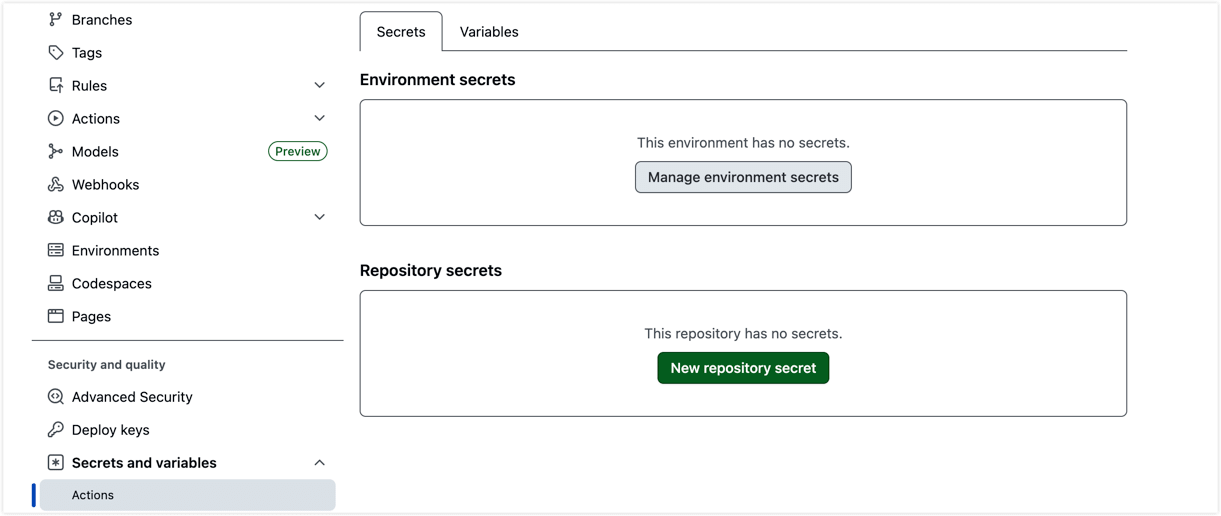
Secret name Description GH_DEPLOY_TOKENThe PAT created in the previous step. {ENV}_TAPDATA_ACCESS_CODEfor the testing environmentAccess code for the testing TapData instance. If you use the official template, the name is SIT_TAPDATA_ACCESS_CODE.PROD_TAPDATA_ACCESS_CODEAccess code for the production TapData instance. {ENV}_TAPDATA_ACCESS_CODEOptional. If the development environment is enabled, add the access code for that environment, such as DEV_TAPDATA_ACCESS_CODE.VAULT_ENCRYPTION_KEYOptional. Encrypts the vault.jsoncredential file generated by the pipeline. -
On the Variables tab, add the following plain-text values:
Variable name Example value {ENV}_TAPDATA_URLfor the testing environmentTesting environment URL, such as http://10.0.0.2:3030. If you use the official template, the name isSIT_TAPDATA_URL.PROD_TAPDATA_URLProduction environment URL. {ENV}_TAPDATA_URLOptional. If the development environment is enabled, add the URL for that environment, such as DEV_TAPDATA_URL.tipTo get a TapData access code, sign in to the corresponding TapData environment as an administrator and go to System Settings > User Management to view the user information. In some environments, the user can also copy the access code from Personal Settings in the upper-right corner.
Step 3: Create Environments and configure connection values
-
In the tenant repository, go to Settings > Environments.
-
Create the business Environments that are actually used, such as development, testing, and production, and create the fixed approval gate
deploy. -
For
deploy, configure Required reviewers. This Environment acts as the resource import approval gate. We recommend adding an operations or release-owner team and enabling Prevent self-review so the person who triggers deployment cannot approve their own change.The following image shows where to configure required reviewers for the
deployEnvironment.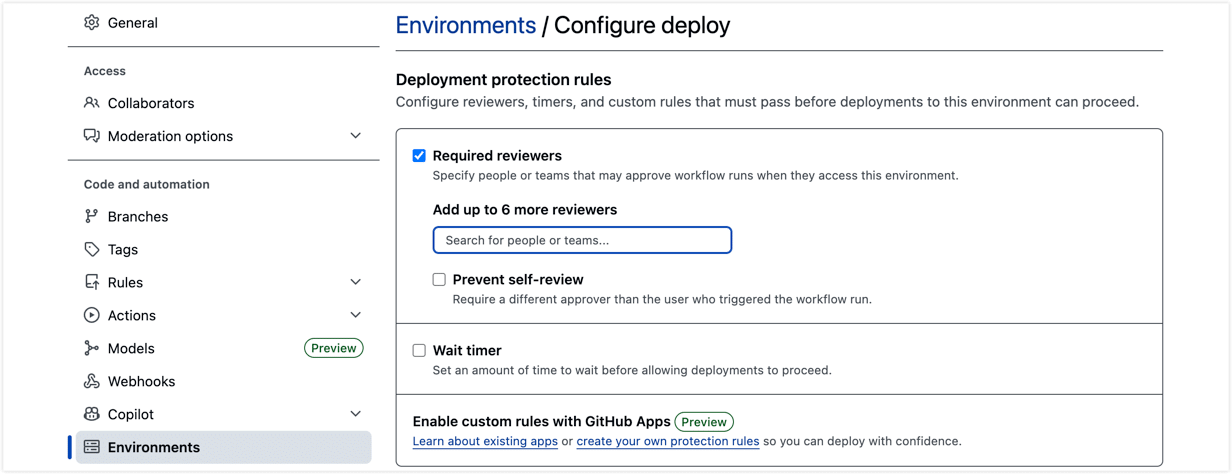
-
deployis only an approval gate. Do not configure TapData URLs, access codes, or connection credentials under it. Configure those values in testing, production, and other business Environments. -
If production release itself requires environment-level approval, configure Required reviewers separately in the
prodEnvironment. -
Configure real connection values under each active environment, such as development, testing, and production. Do not add the environment prefix to connection credential names under an Environment. Use one of the following formats:
- DSN format (for environments with different database names): Configure a
{PREFIX}_DSNVariable and a{PREFIX}_PASSWORDSecret. This is the only format that supports a different database name in each environment, such asorder_devandorder_sit, and the pipeline uses it before the other formats. Leave the password position empty in the DSN, for exampleuser:@host:port/db; for MongoDB, retainusername:@. Store the real password only in the Secret. Never place a plaintext password in a Variable. The DSN stores the address, database name, and username in a plain-text Variable that repository collaborators can view and that might appear in Actions logs. If you do not need a different database name by environment, continue to use an existing format. - Host and port format: Configure
{PREFIX}_URLand{PREFIX}_USERas Variables, and{PREFIX}_PASSWORDas a Secret. Use this format for relational databases with the same database name in each environment. It supportsDEFAULT_*fallback values. - Full URI format: Configure a
{PREFIX}_URISecret, for examplemongodb://user:pass@host:port/db. Use this format for existing MongoDB connections or when you need to keep the entire connection string encrypted.
- DSN format (for environments with different database names): Configure a
Step 4: Install a self-hosted runner
GitHub-hosted runners usually cannot access TapData services and databases in an internal network. Deploy at least one self-hosted runner on an internal Linux server. Register it at the organization level if you want multiple repositories to share it.
-
In the GitHub organization, go to Settings > Actions > Runners, and click New self-hosted runner.
-
On the prepared Linux server, follow the GitHub setup commands to download, register, and start the runner. Add the
tapdatalabel during registration. -
If you use a Runner Group, go to Settings > Actions > Runner groups and confirm that the Runner Group is authorized for the tenant repository that will run deployment. Allow public repositories only when you explicitly accept the security risk.
The following figure shows the Repository access area for Runner Group configuration.
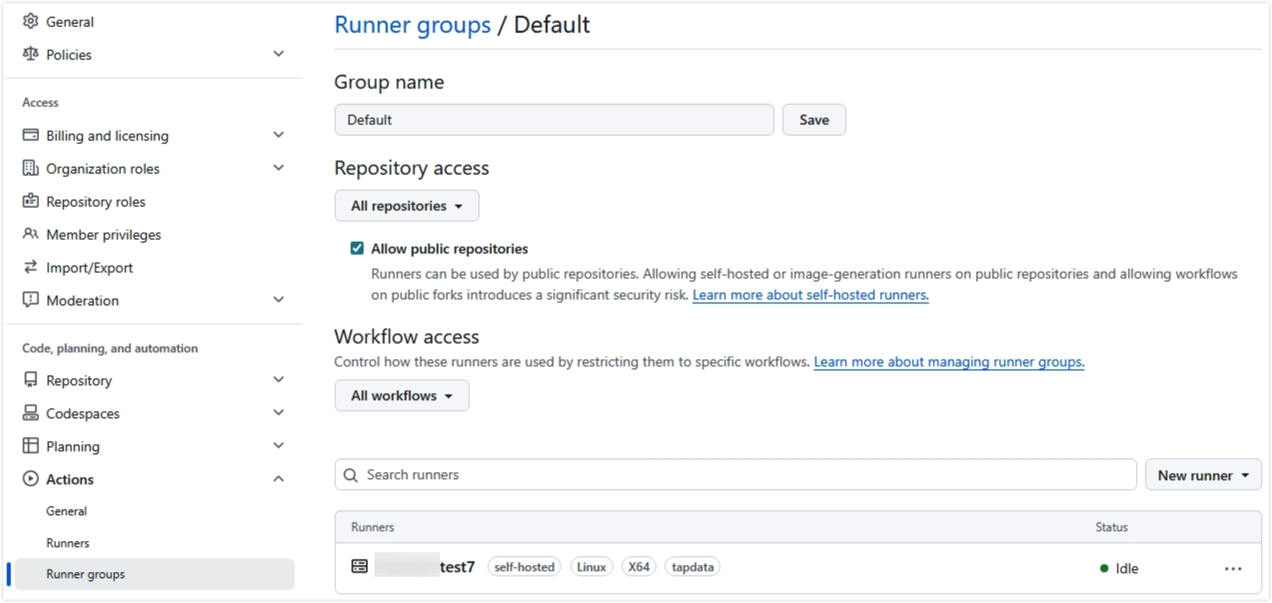
-
Return to the Runners page and confirm that the runner status is
Idle. Verify that it has thetapdatalabel and can access the TapData service ports for all target environments.
Validate the setup
Before the first automated deployment, check the following items:
- The Worker repository is Internal and contains the deployment workflow, rollback workflow, and core scripts.
- The
{WORKER_REPO}placeholder in tenant repository workflows has been replaced with the real Worker repository path. - The tenant repository default branch is
main, or the watched branch in the workflow has been adjusted. - GitHub Secrets and Variables include
GH_DEPLOY_TOKEN, access codes, and TapData URLs for the active business environments, and the tenant repository is authorized to use them. - The tenant repository contains the active business Environments and the fixed approval gate
deploy. - If the customer does not need automated deployment to development, the tenant repository workflow triggers have been adjusted.
- Connection values are configured for active environments according to the naming rules.
- At least one self-hosted runner is
Idle, has thetapdatalabel, the Runner Group is authorized for the tenant repository, and the runner can access all target TapData environments.
After the checklist is complete, continue with Create and deploy a project to package TapData configuration and release it to a target environment.