StarRocks

 TapData Cloud offers you cloud services that are suitable for scenarios requiring rapid deployment and low initial investment, helping you focus more on business development rather than infrastructure management. Free trial with TapData Cloud.
 TapData Enterprise can be deployed in your local data center, making it suitable for scenarios with strict requirements on data sensitivity or network isolation. It can serve to build real-time data warehouses, enable real-time data exchange, data migration, and more.
 TapData Community is an open-source data integration platform that provides basic data synchronization and transformation capabilities. This helps you quickly explore and implement data integration projects. As your project or business grows, you can seamlessly upgrade to TapData Cloud or TapData Enterprise to access more advanced features and service support.
StarRocks is a high-performance data warehouse designed for real-time analytics. It features a vectorized execution engine and an MPP architecture, supporting high concurrency, multidimensional analysis, and real-time data updates. TapData supports using StarRocks as a source or target database in data pipelines to enable large-scale data ingestion and analytics acceleration.
Supported Versions & Architecture
StarRocks 3.x (no restrictions on deployment architecture)
Supported Data Types
| Category | Data Types |
|---|---|
| String | CHAR, VARCHAR, STRING, TEXT |
| Boolean | BOOLEAN |
| Integer | TINYINT, SMALLINT, INT, BIGINT, LARGEINT |
| Numeric | DECIMAL, DECIMALV3, FLOAT, DOUBLE |
| Date/Time | DATE, DATEV2, DATETIME, DATETIMEV2 |
| Aggregation | HLL, BITMAP |
Supported Sync Operations
- Full synchronization (as a source only): Tables and views.
- DML (as a target only): INSERT, UPDATE, DELETE
- DDL apply (as a target only): Add columns, change column attributes, and drop columns.
When used as a source, StarRocks supports only full synchronization for both tables and views. It does not support incremental CDC or DDL event collection.
Notes
-
TapData writes to StarRocks using Stream Load. Since supported operations vary by table type (e.g., detail tables support inserts only, but not updates or deletes), see Table Types Overview for more information.
tipTapData does not automatically create StarRocks table partitions. If the target table requires partitioning, create the table manually before synchronization. For automatically created target tables, configure the bucket key, bucket count, and sort fields in the target node's advanced settings when needed.
-
Avoid frequent transactional operations (e.g., frequent updates/deletes) when using StarRocks as the target, as they may degrade performance.
-
For better performance in batch inserts, it’s recommended to configure the batch size between 10,000 and 100,000 records depending on individual record size. Avoid overly large batches to prevent OOM issues.
-
Large-scale data loading is best performed during off-peak hours to minimize I/O contention and avoid affecting query performance.
Prerequisites
-
Log in to the StarRocks database and run the following command to create a user account for data sync/development tasks:
CREATE USER 'username'@'host' IDENTIFIED BY 'password';- username: User name
- password: Password (For other authentication methods like LDAP, see CREATE USER)
- host: The allowed login host for the user; use
%to allow all hosts
Example:
CREATE USER 'tapdata'@'%' IDENTIFIED BY 'Tap@123456'; -
Grant permissions to the created user account based on the connection type.
- As a source
- As a target
-- Replace with your actual database name and username
GRANT SELECT ON ALL TABLES IN DATABASE your_db_name TO USER your_username;
GRANT SELECT ON ALL VIEWS IN DATABASE your_db_name TO USER your_username;
-- Replace with your actual database name and username
GRANT CREATE TABLE ON DATABASE your_db_name TO USER your_username;
GRANT SELECT, INSERT, UPDATE, DELETE, ALTER, DROP ON ALL TABLES IN DATABASE your_db_name TO USER your_username;tip- As a source, these permissions let TapData read tables, views, and metadata. If you sync only tables, you can skip the
SELECTprivilege on views. - As a target, these permissions cover connection testing, automatic table creation, data writes, and supported field-level DDL apply. If tables are created manually and DDL apply is not required, narrow the privileges based on the features you use.
- If the database is in a non-default catalog, run
SET CATALOG <catalog_name>;before the grant statements. To view existing catalogs, run SHOW CATALOGS. For more information, see Catalog overview.
-
If a firewall protects the StarRocks cluster, allow inbound traffic to these ports so TapData can connect:
- FE nodes: 8030 (HTTP/web services), 9030 (MySQL client protocol)
- BE nodes: 8040 (HTTP/web services)
Connect to StarRocks
-
Log in to TapData platform.
-
In the left navigation bar, click Connections.
-
Click Create on the right side of the page.
-
In the dialog box, search for and select StarRocks.
-
Fill in the connection details as described below:
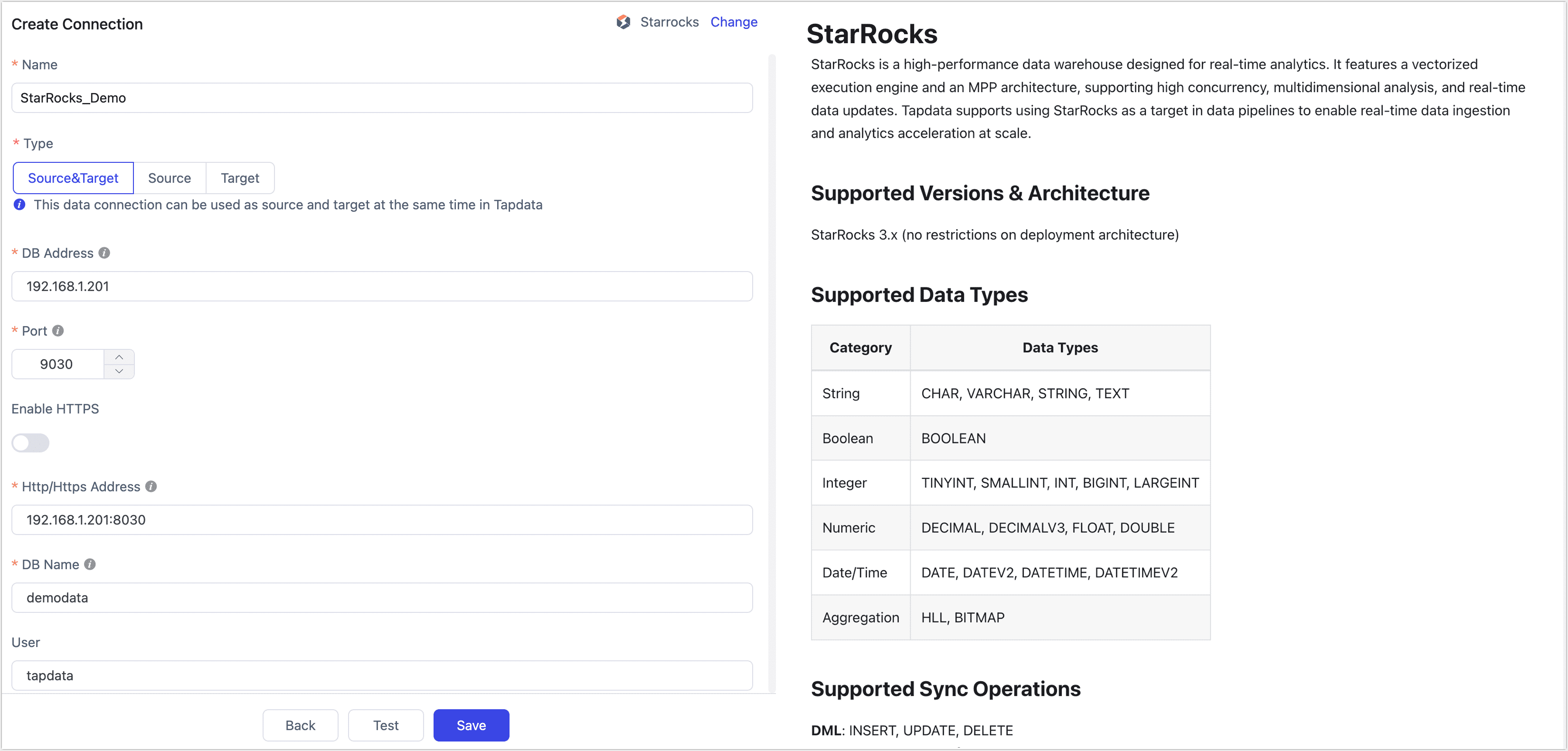
- Basic Settings
- Name: Enter a meaningful and unique name.
- Type: Supports using StarRocks as a source or target database.
- DB Address: The StarRocks connection address.
- Port: The StarRocks query service port. The default port is 9030.
- Enable HTTPS: Choose whether to enable the HTTPS connection without certificates.
- HTTP/HTTPS Address: The HTTP/HTTPS protocol access address for the FE service, including address and port information, e.g.,
http://192.168.1.18:8030. - DB Name: Each connection corresponds to one database. To connect multiple databases, create separate connections.
- User and Password: Enter the database username and password, respectively.
- Number of BE Nodes: TapData will try to auto-detect the number of BE nodes (requires admin privileges). If privileges are insufficient, enter the number manually.
- Advanced Settings
- StarRocks Catalog: StarRocks catalog name (optional if using default). See Catalog Overview for details.
- Additional Parameters: Optional JDBC parameters
- Timezone for Time Fields: Defaults to UTC (offset 0). Affects fields like
DATETIMEandDATETIMEV2(non-timezone-aware). Fields likeDATEorDATEV2are not affected. - Agent Settings: Defaults to Auto Assignment, but can be specified manually
- Model Refresh Frequency: For fewer than 10,000 models, refreshes every hour. For more than 10,000, refresh occurs daily at a specified time.
- Enable Heartbeat Table: If StarRocks is used as a source or target, this toggle enables TapData to create a
_tapdata_heartbeat_tablethat updates every 10 seconds (requires appropriate permissions). The heartbeat task starts automatically after replication or development tasks begin. You can view the heartbeat task in the data source settings.
- Basic Settings
-
Click Test at the bottom of the page. Once it passes, click Save.
Node advanced features
When StarRocks is used as the target node in a data replication task, TapData buffers records locally by table and writes them to StarRocks in batches through Stream Load when either the flush size or flush timeout is reached. For high-frequency, small-batch writes during real-time replication, this mechanism reduces request overhead. You can use the following advanced node settings to control automatic table creation and write behavior, balancing write throughput, data visibility latency, and local buffer usage.
| Configuration | Description |
|---|---|
| Key type | Select the key model for automatic table creation: Primary (default), Duplicate, Aggregate, or Unique. |
| Sort fields | When Key type is set to Duplicate, append writes are used, and no update condition is set, specify the sort fields. |
| Partition field | Used as the bucket key for DISTRIBUTED BY HASH. A manually configured value takes precedence. If no value is set, TapData uses the primary key. If no primary key exists, TapData uses all fields. This setting is not the table partition key. |
| Number of buckets | The number of buckets to use when TapData creates a table automatically. The default value is 2. |
| Table properties | Specifies StarRocks table properties, such as the number of replicas or compression method, for tables that TapData creates automatically. Existing tables are not rebuilt when you change this setting. |
| Write buffer size | The Stream Load write buffer size. The default value is 10240 KB. |
| Write format | Supports JSON (default) and CSV. |
| Flush size | Flushes the local cache for each table after it reaches the specified size. The default value is 100 MB. |
| Flush timeout | Flushes the local cache for a table after the specified wait time. |
| Write limit per minute | Limits the amount of data written per minute. Set the value to 0 for no limit. |